
HopVisor

Find Best Clipping Campaigns 95% faster

Filter all Whop clipping and UGC campaigns by required audience, burn rate, platform-specific rates per 1k views, and more. No more opening every listing to find what you need.
Add to Chrome
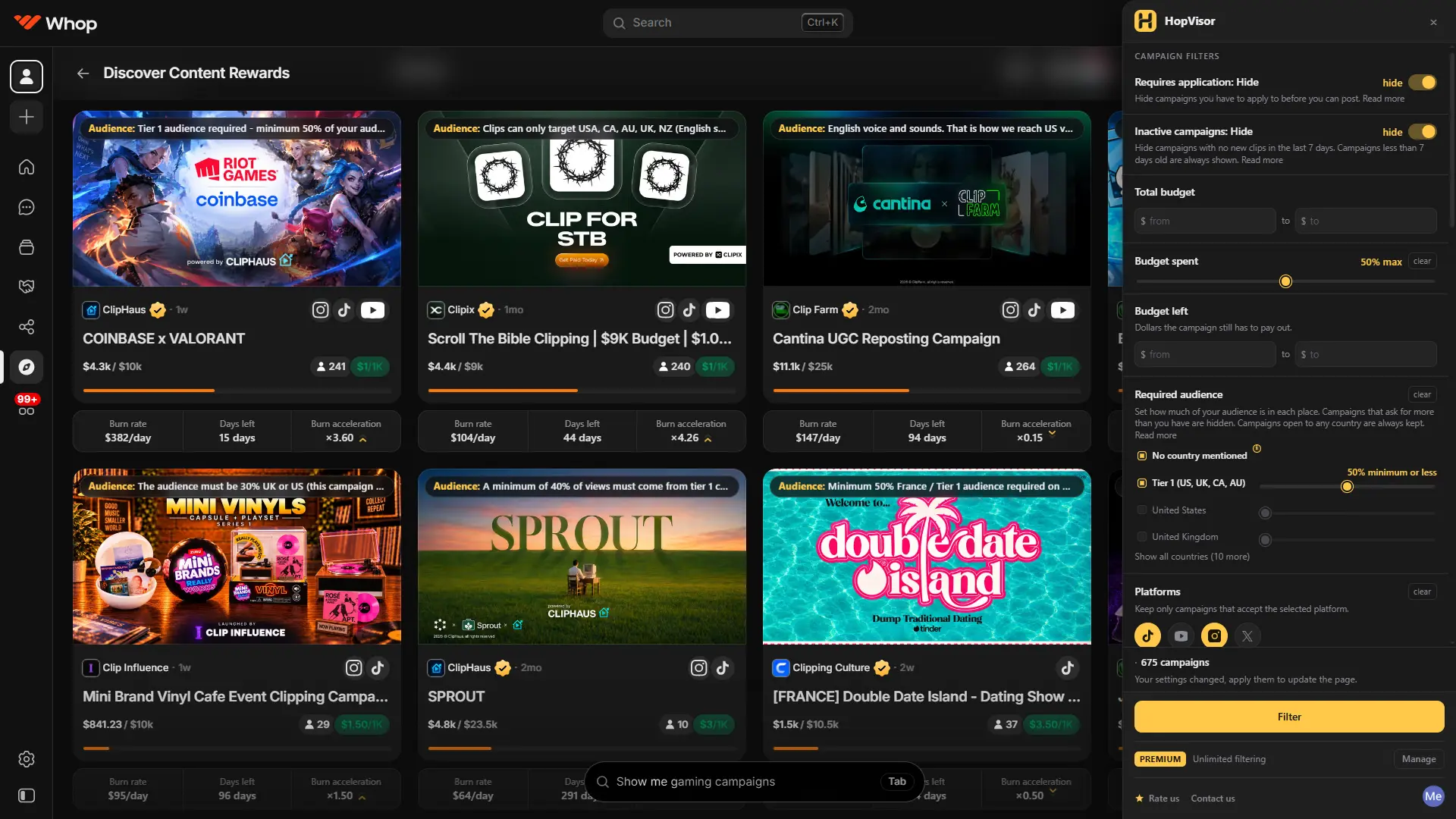
HopVisor's filter panel open next to the Whop Content Rewards listing, filtering campaigns by rate per 1k views and payout thresholds
Why it exists

Spend 95% less time picking campaigns

Checking one campaign by hand means opening it, opening each reference link to find the required audiences, working out how many views before it pays anything, and going back. There are 500 of them.

By hand00:07:20
29 / 500 campaigns1h 58m still to go
With HopVisor00:00:20
500 / 500 campaignsdone

2h 05m of clicking, or 20s of doing nothing.

Shown at 20× speed. By hand assumes 15 seconds a campaign; HopVisor clears the whole listing in about 20.

Required audience

Know who the campaign wants before you join it

The required audience is the first thing to check, and Whop never shows it on the card. To find it you join the campaign, open its references and dig through the brief, for every single campaign. HopVisor reads the brief for you and puts the required audience on top of the card, so you can rule a campaign in or out at a glance.

$2.00/1K
Audience: Minimum 60% Tier-1 (US, UK, CA, AU)

Taken from the campaign's brief. You don't need to join or open the references.

The real numbers

Minimum views and days left, already worked out

A clip earns nothing until it reaches the minimum payout, and the views that takes are different on every platform. Normally you open the campaign and work it out from the minimum payout and each rate. Days left means working out how fast the budget is being spent. HopVisor does both automatically and puts them under every campaign, along with the burn rate and whether it is speeding up.

$2.00/1K
Min. views to get paid10K15K10K10K
Burn rate$412/day
Days left9 days
Burn acceleration×1.24

Worked out from each platform's rate and how fast the budget is going.

Hover for details

Account rules and social media, one hover away

Hover a campaign to see whether it needs a new account, a dedicated page or an existing audience, next to the social media accounts behind it and their followers. A brand people already follow is far easier to go viral with, so you can judge that in seconds. Budget left, earnings per creator and maximum payout are in there too.

$2.00/1K
Audience: Minimum 60% Tier-1 (US, UK, CA, AU)
Min. views to get paid10K15K10K10K
Burn rate$412/day
Days left9 days
Burn acceleration×1.24
AudienceMinimum 60% Tier-1 (US, UK, CA, AU)
Account requirementsNew account requiredCreate a fresh TikTok or Instagram account for the brand. Personal accounts with existing posts are not accepted.
Social mediaBrightloop
Brightloop214K subscribers38K median views per video
@brightloop.app1.2M followers18.4M likes · 412 videos
@brightloop486K followers2.1K posts
What do these numbers mean?

Hover the audience pill or the stats bar on any campaign to open it.

The filter

Set your bar. The rest disappear.

Rate per 1k views per platform, required audience, minimum views to get paid, days left, burn rate, budget left, creators, campaign age, verified brands. Stack as many as you need. Anything that misses is taken off the page rather than greyed out, so you scroll a short list instead of a long one.

TikTok ≥ $1.50 / 1kAudience: Tier-1Days left ≥ 7
500 campaigns → 14 matches
$0.60/1K
$1.20/1K
$2.00/1K
$2.40/1K
$0.90/1K
$0.40/1K
$0.75/1K
$1.80/1K
$1.10/1K

Cards that miss the bar leave the page. They are not greyed out.

Free to try, paid only when you need more

Every filter is on the free plan, none of them held back. You get 5 filter runs a month at no cost, and Premium removes the cap.

Free

$0

No card needed

  • 23 filters
  • 5 filter runs per month
  • 3 MCP runs per month in Claude or ChatGPT, with full results
  • No card needed

Premium

Unlimited

$8.00/month

Save 20%$95.99 billed yearly

  • Everything in Free
  • Unlimited filter runs
  • Unlimited MCP runs, with every matching campaign
  • Cancel any time

Questions

Do I need an account?

Yes, and it is free. HopVisor only runs while you are signed in, which is how your monthly filter allowance is counted. No card is asked for, and the free tier does not expire.

What counts as a filter run?

Every time you press Filter. Changing a number and filtering again spends another one, so it is worth setting your values before you run it. Scrolling the results, or opening a campaign you liked, costs nothing.

What can I filter by?

Twenty things, split into a main panel and an advanced one. The main panel covers whether a campaign requires application, whether it has gone inactive, burn rate, how much of the budget is already spent, your required audience by country, which platforms it accepts, rate per 1k views set separately for each platform, the minimum and maximum views a payout is based on, total budget, budget left, views remaining, how many creators have already joined, campaign age, and whether the brand is verified. The advanced panel adds burn acceleration, burn in the last 24 hours, earnings per creator, earnings left per creator, and estimated days left. Set a minimum on two platforms and you choose whether a campaign has to clear both or just one.

What happened to approval rates?

Whop removed them. Approval rate and campaign requirements are no longer published anywhere on Content Rewards, so nothing can show them and HopVisorno longer tries. Everything it filters on now comes from the listing itself and each campaign’s own payout data, both of which are still there.

Where does it work?

On the Whop Content Rewards page on whop.com. The panel opens there and nowhere else. On any other site the extension stays out of your way.

Does it send my browsing anywhere?

No. Your filters and the campaign data it has already read stay in your browser’s own storage. No campaign data and no browsing activity reaches our servers. The account exists to hold your plan and your monthly count, and nothing else. The privacy policy spells it out.

Can I cancel?

Any time, from your account page. No email and no retention call. You keep Premium until the end of the period you have already paid for. Within 14 days of a charge we refund it in full; see the refund policy.

Is HopVisor made by Whop?

No. HopVisor is an independent extension and is not affiliated with, endorsed by, or connected to Whop.

Which browsers does it support?

Chrome 110 or newer. Other Chromium browsers that can install from the Chrome Web Store, such as Edge, Brave and Opera, generally work, but Chrome is what we test against.

Still stuck? Email contact@hopvisor.com

Get your two hours back

The real rate for your platform on every campaign, and filters that clear away the rest.

Add to Chrome

Free to start, no card needed.